Problem
A non-CPU lens such as the Nikkor AF 180 mm f/2.8 gives an FEE error in a Nikon D7000 when aperture ring on the lens is set. This lens is sharper than most zoom lenses and gives excellent results with an astronomy camera, but the D7000 can't set its aperture. Autofocus and auto-exposure still work normally, but the lens remains at f/2.8 even when it's set to f/22. At all other settings it says "FEE" and won't take a picture. This isn't a problem when doing astrophotography, but sometimes you might want to stop down the diaphragm.
You can see the actual aperture setting by looking into the front of the lens. The solution works with the Nikkor AF 180 mm f/2.8 lens and a D7000. Use caution when trying them on other cameras or lenses.
Non-solution 1
The manual suggests setting the lens data (maximum aperture and focal length) in the Setup menu. If this is done, then pressing the Fn button on the camera will display the correct settings on the LCD. The camera puts these settings into the metadata, but it doesn't do anything else: the camera still says "FEE".
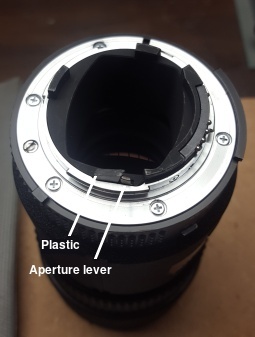
Nikkor AF 180 mm f/2.8 lens with plastic inserted on the safe side
Non-Solution 2
There is a metal lever on the rear of the lens that sets the aperture. It might seem logical to insert a piece of plastic in the slot to set the aperture. Set the aperture ring to f/22 before attaching the lens. The camera recognizes it as a non-CPU lens and puts whatever numbers you gave it in the metadata. If you push the lever to maximum aperture before inserting the plastic, the lens will always stay at f/2.8, so this is equivalent to doing nothing.
Do not insert the plastic on the other side of the lever to keep the aperture from opening. This would damage your camera.
Solution
The solution is simple: Set the aperture ring to f/22 before attaching the lens. Don't turn the lens all the way (where it would click) when attaching the lens. View the lens from the front to make sure the aperture stays at f/22.
The camera will only work on Manual mode and autofocus will be disabled. Depending on how far you turned it, the display will show anything from f/11 to f/90. The aperture ring will now work but everything must be done manually. You can now get apertures smaller than 2.8. The number you entered in the Setup Menu will be put in the metadata, and the FEE error is not displayed.
Disclaimer
This worked on my lens and camera. Use at your own risk.
aug 28 2026